2027 Work Office Planner: A Strategic Tool for Intentional Professionals
Planning is not about filling pages. It is about making decisions in advance so that your energy goes where it matters most. The 2027 Work Office Planner is a comprehensive system designed to help professionals, entrepreneurs, and creators structure their work life with clarity and purpose. Whether you are managing multiple projects, tracking deadlines, or mapping out long-term business growth, this planner offers a framework that goes beyond simple scheduling.
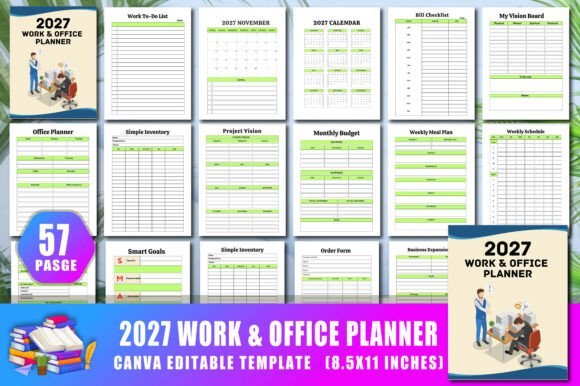
What makes this planner particularly useful is its flexibility. Built with a Canva interior that is fully editable, you are not locked into a rigid design. You can adjust colors, shapes, text, and layout elements to match your workflow, brand identity, or personal preferences. This is not a static product. It is a tool you can shape to fit your actual needs.
Why a Structured Work Office Planner Matters in 2027
The work environment continues to evolve. Hybrid schedules, remote collaboration, and increasing demands on attention make structured planning more valuable, not less. A planner like the 2027 Work Office Planner helps you move from reactive to intentional work. Instead of letting emails and urgent tasks dictate your day, you decide in advance what deserves your focus.
This particular planner includes dedicated sections for appointment scheduling, lead follow-up, meeting minutes, work project plans, and daily goals. These are not arbitrary categories. They correspond to the recurring activities that drive results in most professional settings. When you have a dedicated space for each function, you reduce mental clutter and improve follow-through.
The Strategic Value of a Customizable Planner
Offering a 2027 Work Office Planner Canva Interior means you can treat this planner as a living document. If your workflow changes mid-year, you can adjust the layout. If a new project emerges, you can add a tracker or modify an existing one. This adaptability is critical for professionals whose work does not fit neatly into a one-size-fits-all template.
For example, the planner includes a Snowball Tracker and Income Tracker. You might use these for financial goals, but you could also repurpose them for tracking client acquisition or project milestones. The ability to edit on Canva means you are not stuck with a predefined use case. You can align the tool with your actual priorities.
Key Sections and How to Use Them Intentionally
Let me walk through some of the core components of the 2027 Work Office Planner and offer practical guidance on how to get the most from each.
Belongs To Page and Personalization
This may seem like a small detail, but claiming ownership of your planner sets a tone of accountability. Fill in your name, role, and the primary purpose you want this planner to serve. If you are using it for multiple businesses or roles, note that upfront. This simple act of personalization reinforces that this is your working document, not a generic notebook.
2027 Calendar and Holiday List
An annual overview is essential for high-level planning. The 2027 calendar and name of holiday section allow you to mark key dates early. Before the year begins, block out holidays, industry events, tax deadlines, and personal commitments. This prevents double-booking and gives you a realistic view of available working weeks.
Tip: Use the holiday list to plan content calendars, marketing campaigns, or client outreach windows. Knowing when your audience is likely away from the office helps you time your initiatives better.
Monthly Pages January Through December 2027
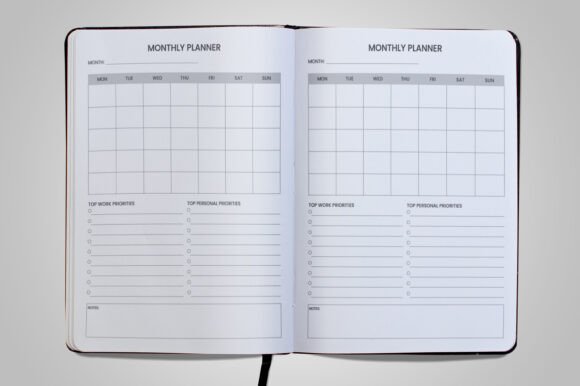
Each month from January to December 2027 has its own dedicated space. Rather than just listing dates, use these pages to set monthly priorities. Ask yourself: What must be accomplished this month? What projects need to move forward? Which clients require attention? Answering these questions before the month begins shifts you from reactive to proactive.
Consider reviewing the previous month's outcomes before filling in the new month. This reflection loop improves decision-making over time.
Office Planner and Work Project Plan
The office planner section is your command center. Use it to track ongoing responsibilities, recurring tasks, and administrative duties. The work project plan pages are where you break down larger initiatives into actionable steps. For each project, define the outcome, key milestones, deadlines, and the person responsible. This is especially useful for entrepreneurs and small business owners who juggle multiple projects simultaneously.
Appointment Schedule and Meeting Schedules
Separating appointments from general tasks prevents calendar clutter. The appointment schedule section is for time-sensitive commitments with others. The meeting schedules page allows you to plan recurring or one-off meetings with purpose. Before scheduling any meeting, ask: Is this necessary? What is the desired outcome? Can this be an email? This discipline alone can reclaim hours each week.
Deadlines List and Calls List
Deadlines are commitments. The deadlines list gives you a central place to track every due date across projects, client work, and internal tasks. Review this list daily. The calls list is for tracking phone conversations, which remain a critical communication channel for many professionals. Note the purpose, key points, and follow-up actions for each call.
Lead Follow-up and Meeting Minutes
For sales and business development, the lead follow-up section is invaluable. Track where each lead is in your pipeline, when you last contacted them, and what the next step is. Consistency in follow-up is often the difference between a closed deal and a lost opportunity.
The meeting minutes pages help you capture decisions, action items, and accountability. Without written minutes, meetings lose their effectiveness. Use this section to record who is responsible for what and by when. Share these notes with attendees to ensure alignment.
Work To-Do List and Daily Plan
The work to-do list captures everything that needs attention. But the real power lies in the daily plan. Each day, select three to five tasks from your to-do list that must be completed. Focus on those before anything else. This prevents the common trap of doing many low-value tasks while important work gets postponed.
Weekly Planner, Weekly Schedule, and Weekly Meal Plan
The weekly pages help you zoom out from daily intensity. The weekly planner is for priorities and goals. The weekly schedule blocks out time for specific activities. Including a weekly meal plan recognizes that professional performance is influenced by physical well-being. Planning meals reduces decision fatigue and supports consistent energy levels.
Monthly Budget and Saving Tracker
Financial planning is often overlooked in work planners. The monthly budget and saving tracker sections encourage you to align your spending with your goals. Track income, expenses, and savings consistently. The saving goals page allows you to set specific targets, whether for business investment, equipment, or personal milestones. The expenses tracker and bill checklist help you stay on top of outflows.
Daily Goals, My Goals, and Vision Board
The daily goals and my goals sections are for short-term and long-term aspirations. Write them down, review them regularly, and adjust as needed. The vision board and my vision board pages offer a creative space to visualize what you are working toward. This is not just motivational fluff. Visual cues can reinforce commitment and help you make decisions that align with your bigger picture.
Business Overview, Business Expansion, and Project Vision
For business owners, the business overview and business expansion pages are strategic assets. Use them to document your business model, target market, competitive advantages, and growth plans. The project vision page helps you articulate the purpose and desired impact of your key initiatives. When you revisit these pages throughout the year, you stay grounded in your strategy rather than getting lost in operational details.
Accounting Tools: Income Tracker, Expenses Tracker, and Bill Checklist
Financial tracking is not just for accountants. The dual expenses tracker pages and income tracker provide a simple system for monitoring cash flow. The bill checklist ensures you never miss a payment. For freelancers and small business owners, this is essential for maintaining healthy finances and avoiding late fees.
Risks of Using the Planner Without Clear Goals
A planner is a tool, not a solution. If you fill in the 2027 Work Office Planner without first clarifying what you want to achieve, you risk creating a detailed record of busyness rather than progress. The pages will be full, but your results may not improve.
Before you start, take thirty minutes to define your primary objectives for 2027. What are the three to five most important outcomes you want to achieve professionally? Write these in the my goals or project vision pages. Then, as you use the planner, ask yourself whether each task, meeting, or deadline moves you closer to those outcomes. If it does not, reconsider whether it deserves your time.
Another risk is inconsistency. A planner works when you use it regularly. If you fill it out sporadically, it becomes a source of stress rather than clarity. Commit to a daily and weekly review rhythm. Even ten minutes each morning and thirty minutes each week can transform how you use the planner.
Practical Examples of Strategic Use
Let me offer a few concrete scenarios.
If you are a marketing consultant, use the lead follow-up section to track potential clients through your sales process. Pair this with the deadlines list for proposal due dates and the monthly budget to manage project profitability. The business expansion pages can hold your service offering roadmap for the year.
If you are a freelancer juggling multiple clients, the work project plan and appointment schedule become your central coordination tools. Use the income tracker and expenses tracker to monitor cash flow weekly. The saving goals page can help you set aside funds for taxes or equipment upgrades.
If you are an educator or administrator, the meeting minutes and calls list help you stay organized across committees and parent communications. The weekly schedule allows you to block time for lesson planning, grading, and professional development without overcommitting.
How to Approach the Planner for Long-Term Results
Start with the annual and monthly pages. Map out the major milestones and deadlines for 2027 early. Then, as each month approaches, break those down into weekly and daily actions. Use the vision board and my vision board pages to keep your deeper motivations visible. Review your business overview and project vision quarterly to ensure you are still on the right track.
Take advantage of the Canva interior. If a section does not fit your workflow, change it. Add or remove fields, adjust colors, or rearrange elements. This is your planner, not a prescribed formula. The more it reflects your actual thinking and processes, the more useful it will be.
Finally, keep your planner accessible. Whether digital or printed, have it available during meetings, planning sessions, and daily reviews. A planner that sits on a shelf is just a notebook. A planner that you engage with daily becomes a decision-making partner.
Bottom Line: Intentional Planning Beats Random Action
The 2027 Work Office Planner and its Canva interior offer a flexible, comprehensive system for professionals who want to work with intention rather than reaction. With sections covering everything from daily tasks to business expansion, it supports both the operational and strategic sides of your work. But its value depends on how you use it. Clarify your goals, review regularly, and adapt the tool to your needs. That combination turns a planner into a real advantage for the year ahead.