Deep Work Tracker Personal Planner for Focused Productivity
Distraction is the default state of modern life. Notifications, open tabs, and endless meetings fracture attention into tiny, unproductive fragments. The Deep Work Tracker Personal Planner offers a practical countermeasure. Designed for anyone who needs sustained concentration—whether writing code, drafting a manuscript, or mapping out a marketing strategy—this planner helps you log, measure, and protect your focused time. It is not a generic diary. It is a targeted tool built around the concept of deep work, giving you a structured way to track when you do your best thinking and how much of it actually happens each day.
What Makes the Deep Work Tracker Personal Planner Different
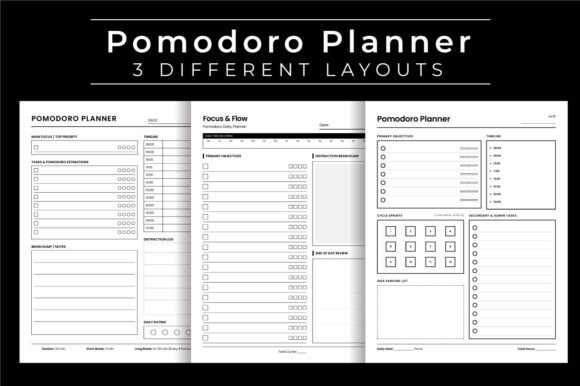
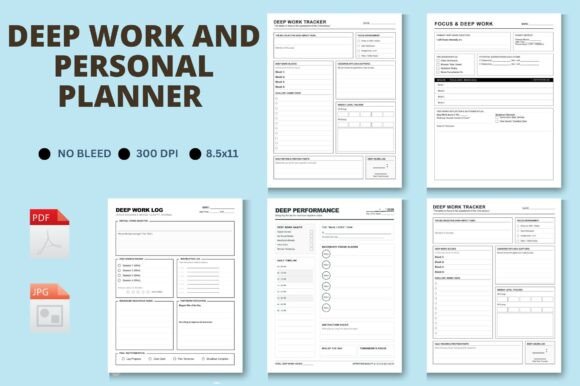
Many planners try to do everything. They mix appointments, to-dos, habit trackers, and notes into one crowded layout, which often buries what matters most. This planner takes the opposite approach. It centers entirely on tracking focused sessions, so you can see patterns in your concentration and adjust your schedule accordingly. The files include four distinct layouts, which means you are not locked into a single format. You can choose the structure that matches how your mind works on any given day, or rotate between layouts to keep the process fresh.
Each layout is provided as both a high-resolution JPG and a PDF at 300 dpi. The resolution matters because it preserves crisp text and clean lines when you print at home, at a print shop, or upload to print-on-demand services like KDP. The PDFs are print-ready, sized at 8.5″ x 11″ with no bleed, which is the standard interior size for Amazon KDP books. That makes this planner especially practical if you plan to publish your own productivity journal or offer it as a digital download. You get professional-grade files without needing to build layouts from scratch.
Four Layouts, One Purpose: Tracking Deep Work
Having options does not mean complexity. The four layouts are variations on a single theme: recording the start and end of focused sessions, noting the task or project, and rating the quality of the session. One layout might emphasize a daily log with space for notes, while another uses a weekly spread so you can see your deep work streaks at a glance. A third layout might include a reflection section where you jot down what helped or hindered concentration. The fourth layout could be minimal—just the essentials for people who want to track without any extra friction.
You can pick the layout that fits your current workflow. If you are deep in a creative project, the minimal version keeps you moving. If you are analyzing your productivity patterns, the detailed version gives you richer data. Because all layouts are included in the same download, you can even mix and match throughout the month, using one format for workdays and another for weekends or creative blocks.
Practical Applications Across Work and Life
The Deep Work Tracker Personal Planner is not limited to office workers. Its applications span a wide range of environments, and the customization options make it adaptable to almost any context.
- For freelancers and solopreneurs: When you manage your own time, it is easy to let client messages or admin tasks eat into focused work. Use the planner to set daily deep work blocks and protect them. Over a month, you will see which hours give you the highest output and can schedule your most important work accordingly.
- For writers, designers, and creators: Creative work requires uninterrupted stretches. The planner helps you log when you enter flow state and how long it lasts. You might discover that your best writing happens in ninety-minute morning sessions, or that you need two shorter blocks with a walk in between.
- For educators and researchers: Grading, lesson planning, and research all demand concentration. The planner can track how much genuine focus each task received, which helps you allocate future time more realistically. It also serves as a record of your intellectual labor, useful for annual reviews or grant reports.
- For marketers and business owners: Strategy work—campaign planning, competitor analysis, content roadmaps—often gets pushed aside by urgent but shallow tasks. Using the planner to deliberately schedule deep work for these activities ensures you make progress on what actually moves the business forward.
- For students and lifelong learners: Studying for exams or mastering a new skill requires sustained attention. The planner makes studying visible and measurable, which can motivate you to extend your focus gradually. It also helps identify when you are simply rereading passively versus truly engaging with material.
Why High Resolution and Print-Ready Files Matter
When you invest time in a planning system, the physical quality of the printed pages affects how seriously you take the process. A blurry or pixelated template feels disposable. The 300 dpi resolution ensures that every line, box, and label prints sharp and clear, whether you use a laser printer at home or send it to a professional print service. The 8.5″ x 11″ size is standard for binders, three-ring notebooks, and KDP paperbacks, so you can integrate these pages into your existing system or create a standalone journal.
The no-bleed specification is especially important for KDP publishing. Books with bleed require extra margin trimming and can cause alignment issues if you are not experienced with print setup. This planner avoids that complication entirely. You can upload the PDFs directly, and they will fit perfectly within the standard interior dimensions. For digital sellers, the JPG files are ready for online previews, social media mockups, or direct customer download. The dual format gives you flexibility for both print and digital distribution.
Customization Without Complication
The files are customizable, which means you are not stuck with a rigid template. You can open the JPGs in image editing software to add your own branding, change colors, or include specific prompts that match your workflow. If you prefer to keep things simple, the print-ready PDFs work right out of the box. This dual approach lets you scale your use of the planner. Start with the PDFs to test whether the layouts suit your habits, then customize the JPGs once you know what adjustments you need.
For publishers and content creators, the editable files allow you to rebrand the planner as your own product. Add your logo, adjust the headings, or translate the prompts into another language. The four layouts give you enough variety to offer a bundle without extra design work. Because the files are high resolution and properly sized, you can focus on polish and presentation rather than technical fixes.
Building a Deep Work Habit With Real Data
The real value of a tracker lies not in the act of recording but in what you do with the information. After two weeks of using the Deep Work Tracker Personal Planner, you can look back and see concrete patterns. You might notice that your deepest work happens in the morning, that you can sustain focus for about fifty minutes before needing a break, or that you consistently underestimate how much time a task requires. These insights are hard to gain from intuition alone. The planner makes them visible, and visibility is the first step toward change.
You can also use the tracker to set gradual goals. If your average deep work session is thirty minutes, aim for thirty-five next week. If you only logged two deep work sessions on Tuesday, plan ways to protect that time slot. The planner becomes a feedback loop: you track, you review, you adjust, and you track again. Over several months, the cumulative effect is a measurable increase in your capacity for focused work.
Practical Considerations Before You Start
To get the most from this planner, consider a few practical points:
- Choose one layout and commit for a week. Jumping between layouts too quickly makes it hard to spot trends. Give each format a fair trial before deciding which fits best.
- Print on quality paper. While the PDFs work on any paper, a heavier weight (around 24lb or 90gsm) feels better and reduces ink bleed-through if you use pens or markers.
- Pair with a consistent review time. Set aside five minutes at the end of each day or week to look over your entries. The tracker generates raw data, but the review is where understanding happens.
- Customize only after you understand your needs. The blank JPGs are tempting to tweak immediately, but using the original layouts first reveals what you actually want to change rather than what you assume needs changing.
- Use for one project at a time. If you track deep work across multiple unrelated projects, separate them with different colors or tags within the same layout. This keeps the data clean and actionable.
Who Benefits Most From This Planner
While anyone can use a deep work tracker, certain groups will find it especially valuable. Professionals who bill by the hour or by the project can use the logs to justify their rates and estimate future timelines more accurately. Creators who struggle with consistency can use the tracker to build accountability. Marketers and entrepreneurs who manage multiple campaigns can protect strategic thinking from being crowded out by tactical firefighting. Publishers and bloggers who produce regular content can identify their most productive writing windows and protect them from meetings or social media scrolling.
The planner also serves as a boundary tool. When you log a deep work session, you are making a visible commitment to yourself. That act alone makes it harder to accept interruptions. Over time, the habit of tracking reshapes how you allocate your attention, not just during tracked sessions but throughout the entire day.
Working With the Files in Practice
The download includes four JPGs and four PDFs, each representing one of the four layouts. The JPGs are ideal for digital use: import them into GoodNotes, Notability, or any annotation app, and track directly on your tablet. The PDFs are optimized for printing, with margins and spacing designed for standard paper. If you are preparing a KDP upload, use the PDFs as single pages or combine them into a book file using software like Adobe Acrobat or Canva. The no-bleed format means you do not need to adjust margins or trim boxes—just arrange the pages in your preferred order and export.
For digital product sellers, these files represent a ready-to-sell asset. Add a cover page, write a short usage guide, and you have a complete printable planner. The four layouts give your customers choice, which increases perceived value. The high resolution and KDP compatibility also ensure that your product meets Amazon’s technical standards, reducing the risk of rejection or poor print quality.
The Role of a Simple Tool in a Complex World
Productivity tools often promise transformation but deliver complexity. The Deep Work Tracker Personal Planner does the opposite. It strips away everything except what you need to measure and protect focused time. The four layouts offer flexibility without overwhelming choice. The high-resolution files ensure a professional result whether you print one page or a hundred. The KDP-ready sizing removes technical barriers for publishers. And the simple act of tracking, day after day, builds a habit that compounds into real gains in output and satisfaction.
If you have been looking for a way to make your concentration visible, to understand where your time actually goes, and to build a system that protects your best thinking, this planner provides a straightforward path. Start with one layout, track honestly, and let the data show you what is possible.