Pomodoro Focus Productivity Planner Guide
Staying productive in a world full of notifications, open tabs, and endless to-do lists can feel like an uphill battle. The Pomodoro Focus Productivity Planner offers a structured yet flexible approach to reclaiming your time and attention. Designed around the proven Pomodoro technique, this planner blends time-blocking with intentional reflection, making it easier to get meaningful work done without burning out.
At its heart, the planner is a practical tool for anyone who wants to stop reacting to distractions and start focusing on what truly matters. Whether you are a freelancer juggling multiple projects, a student preparing for exams, or a small business owner mapping out your week, this system helps you break work into manageable sprints while keeping your larger goals in view. The result is a calmer, more deliberate way of working that respects both your energy and your deadlines.
What Makes This Planner Different
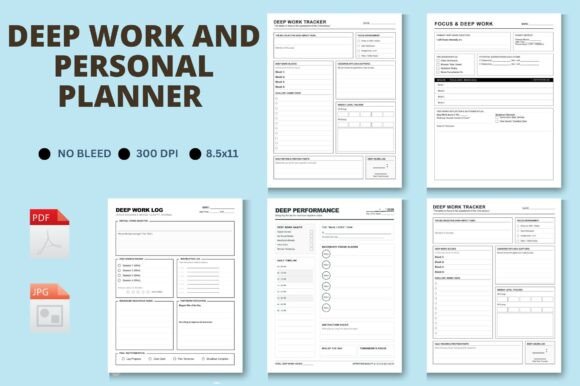
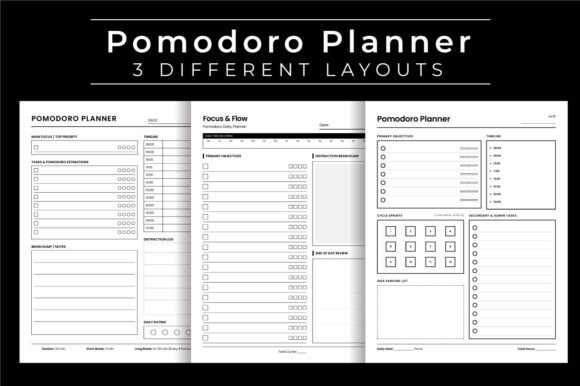
Unlike simple to-do lists or basic notebooks, the Pomodoro Focus Productivity Planner combines several essential elements into one cohesive system. It guides you through each stage of a focused work session, from setting your main intention to reviewing how the day went. The built-in sections for tracking distractions and rating your daily focus turn abstract ideas about productivity into concrete, actionable data.
- Main Focus and Primary Objectives – Each day begins by clarifying what matters most. Instead of scattering your energy across a dozen small tasks, you identify one or two key outcomes that will make the day feel successful.
- Tasks Estimations and Timeline – Before you start, you estimate how many Pomodoro cycles each task will take. This simple habit trains your brain to plan realistically and reduces the stress of underestimating how long things actually take.
- Distraction Log – A non-judgmental space to note what pulled your attention. Over time, you spot patterns and make small changes to your environment that protect your focus.
- Daily Rating and Focus Flow – At the end of each day, you rate your focus and review your flow. This reflection turns every workday into a learning opportunity, helping you adjust your approach as you go.
- Cycle Sprints – Work is broken into focused intervals with short breaks in between. This rhythm keeps your mind fresh and prevents the fatigue that comes from long, unstructured work sessions.
Why People Are Turning to This Approach
Many adults in their twenties, thirties, and forties face similar productivity challenges: too many tasks, constant interruptions, and a nagging sense that they could be doing more. The Pomodoro Focus Productivity Planner speaks directly to these struggles. It does not promise to magically give you more hours in the day. Instead, it helps you use the hours you have with greater intention and less mental friction.
Creatives appreciate the distraction log for capturing random ideas without derailing their current work. Professionals use the timeline view to map out complex projects, while entrepreneurs rely on the daily rating to stay accountable when working alone. Educators and hobbyists find that the cycle sprints make learning or practicing new skills feel less overwhelming. The planner adapts to your context rather than forcing you into a rigid mold.
Practical Use Cases for Real Life
Imagine you are a freelance writer with three client deadlines this week. Using the planner, you start Monday by setting your Main Focus to complete the first draft of a major article. You estimate it will take four Pomodoro cycles. On your timeline, you block out two hours in the morning. During your first sprint, you hear your phone buzz. Instead of checking it, you jot down the distraction in your log and return to writing. By the end of the morning, you have finished the draft and given yourself a realistic rating of seven out of ten, noting that tomorrow you will silence notifications completely.
For a small business owner planning a product launch, the Primary Objectives section becomes a weekly anchor. Each day, you identify the one task that will move the launch forward. The Cycle Sprints keep you from spending three hours on a single email, while the Distraction Log reveals that social media browsing spikes after lunch. You decide to schedule creative work for the morning and administrative tasks for the afternoon, when your focus naturally dips.
A student preparing for certification exams might use the Tasks Estimations feature to break a dense textbook into manageable study sessions. By assigning a certain number of sprints to each chapter, studying becomes a series of small wins instead of an intimidating mountain. The Daily Rating helps them notice which study methods lead to better retention, allowing them to refine their approach week after week.
What to Consider Before You Start
The Pomodoro Focus Productivity Planner works best when you treat it as a guide rather than a strict rulebook. Some days you will complete every sprint exactly as planned. Other days, life interrupts, and that is okay. The real value lies in the reflection that happens at the end of each day, not in perfect adherence to the schedule.
Choose Your Layout Wisely
The planner comes with three different layouts, each offering a slightly different visual structure. One layout might emphasize the timeline and task estimations, while another gives more space to the distraction log and daily rating. Flip through the options and pick the one that feels most natural to your workflow. You can even try one layout for a week and switch to another if your needs change.
Make It Yours
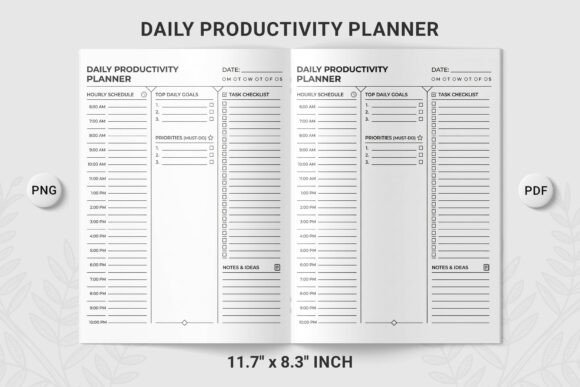
Because the files are customizable and provided in both PDF and JPG formats, you have flexibility. The 8.5 by 11 inch size is standard and prints cleanly without bleed. You can print the full 120-page book, or pick and choose specific pages that fit your current projects. The high-resolution 300 dpi files ensure crisp text and clean lines, whether you print at home or use a professional service. If you plan to upload to Amazon KDP, the no-bleed interior and ready-to-upload format save you hours of formatting hassle.
Start Small and Build Momentum
If you are new to the Pomodoro technique, do not try to fill every section on day one. Begin with the Main Focus and Cycle Sprints. Once those feel natural, add the Distraction Log and Daily Rating. The Tasks Estimations and Timeline work well once you have a few days of data to inform your planning. Let the planner grow with you rather than overwhelming yourself from the start.
How the Planner Supports Deeper Work
The concept of Focus Flow is central to this system. Flow occurs when you are fully immersed in a task, losing track of time because your attention is completely engaged. The Pomodoro Focus Productivity Planner creates the conditions for flow by removing the need to make constant decisions about what to do next. When you already know your Primary Objectives and have estimated your tasks, your brain can settle into work without hesitation.
The Distraction Log plays a subtle but powerful role here. By writing down distractions instead of acting on them, you train your mind to observe interruptions without being controlled by them. Over weeks of use, many people report fewer distractions overall because they have become more aware of their triggers and adjusted their environment accordingly.
Who Benefits Most from This Planner
While the planner works for a wide range of people, certain groups tend to find it especially useful.
- Freelancers and remote workers who need structure without a manager looking over their shoulder
- Entrepreneurs juggling multiple roles and struggling to prioritize
- Writers, designers, and other creatives who need to balance inspiration with deadlines
- Students and lifelong learners tackling complex material
- Anyone transitioning from a reactive work style to a more intentional one
If you have tried digital productivity apps and felt overwhelmed by notifications or subscription fatigue, the tactile nature of a printed planner offers a welcome reset. There is no learning curve, no software update, and no distraction built into the tool itself.
Making the Most of the Included Files
The product includes three PDF files, each 120 pages long, plus three JPG versions for preview or digital annotation. The 300 dpi resolution means everything prints clearly, and the 8.5 by 11 inch size fits neatly into a standard binder or can be used as a standalone notebook. Because there is no bleed, you can print double-sided without worrying about content disappearing into the binding.
If you are preparing this for Amazon KDP, the ready-to-upload format eliminates guesswork. The interior dimensions are already set to industry standards, and the customizable nature of the files lets you add your own branding or adjust page counts if needed. Want a 100-page version for a shorter challenge? Simply select the pages that fit your timeframe. Need a 150-page version for a quarter-long project? Duplicate your favorite spreads. The flexibility is built in.
For personal use, print a single copy and test the layouts for a week. See which sections you reach for most often and which ones you skip. Over time, you will develop a rhythm that feels effortless, and the planner becomes a natural part of your daily routine rather than another task to manage.
A Practical Starting Point
If you are unsure where to begin, open the planner to tomorrow's date. Write down one Main Focus for the day. Set a timer for 25 minutes and start working on that focus. When the timer ends, take a five-minute break and log any distractions you noticed. Repeat this cycle three or four times, then rate your focus at the end of the day. That is all it takes to experience the core of the system. From there, you can explore the Tasks Estimations, Timeline, and Cycle Sprints at your own pace.
The Pomodoro Focus Productivity Planner is not about working harder or squeezing every second out of your day. It is about working with greater clarity, reducing the mental noise that slows you down, and building a sustainable practice that supports your goals over the long term. Whether you are chasing a deadline, building a business, or simply trying to make your days feel less scattered, this planner gives you a framework to move forward with purpose.