Daily Productivity Planner: A Clean Approach to Managing Your Time
If you have ever stared at a blank page wondering where to begin with your day, you are not alone. The gap between intention and action is often just a matter of structure. That is where a well-designed planning tool becomes more than a nice-to-have; it becomes a quiet partner in your daily workflow. The Daily Productivity Planner PNG offers a minimal black and white template that strips away distractions and puts the focus squarely on what matters: your goals, your priorities, and your schedule. It is a straightforward system that works whether you are running a business, juggling coursework, or trying to fit creative work into an already full calendar.
What Makes This Daily Productivity Planner Different
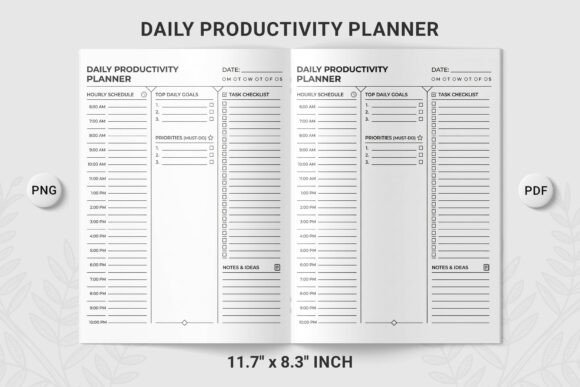
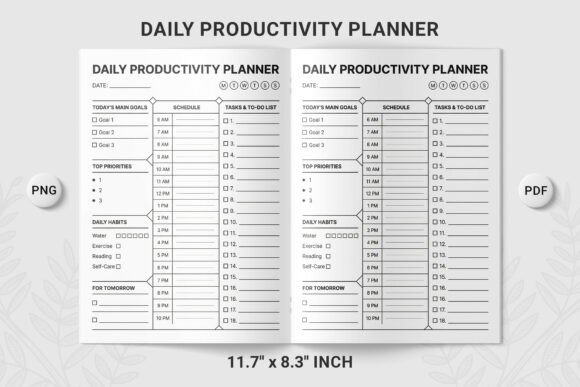
At first glance, this planner looks simple. That is the point. The design includes dedicated sections for Today's Main Goals, Priorities, Daily Habits, and a Schedule and Tasks To-Do List. Each section serves a specific purpose, and together they create a complete picture of your day. The layout uses checkboxes, numbered task lines, and an hourly schedule running from 6 AM to 10 PM. That sixteen-hour window covers most waking hours, giving you room to plan work, meals, exercise, family time, and rest without squeezing everything into a cramped grid.
One of the strongest qualities of this Daily Productivity Planner PNG is its transparent background. That detail matters more than you might think. You can drop this template into a digital notebook, overlay it on a custom background in a design app, or print it onto branded paper without fighting white boxes or awkward edges. It is a small thing that makes the planner feel versatile rather than locked into one format.
Practical Applications Across Different Environments
A tool like this works across a surprising range of settings. Here are a few real-world ways people are using it right now.
For Professionals and Entrepreneurs
If your day involves client meetings, project deadlines, and a growing to-do list, the Daily Productivity Planner PNG helps you separate the urgent from the important. The Top Three Priorities section forces a decision early in the day. You cannot list fifteen priorities and call them priorities; the format encourages honesty. Many professionals use the hourly schedule to block time for deep work, leaving the to-do list for smaller tasks that fit between focused sessions. For entrepreneurs juggling multiple roles, the habit tracker serves as a gentle reminder to check in on things like networking, exercise, or learning new skills that often fall through the cracks.
For Students and Educators
Students face a unique challenge: managing coursework, study time, extracurriculars, and often a part-time job. The numbered task lines are especially useful here. You can number assignments by due date, by difficulty, or by the order you plan to complete them. The schedule grid works well for mapping out class times, study blocks, and breaks. Some students use the Goals section to write one academic goal and one personal goal each day, which keeps life balanced during intense semesters. Educators have also adopted this planner for lesson planning, using the priority section to identify key learning objectives and the schedule to time out different activities.
For Creatives and Freelancers
Freelancers often work with irregular schedules. A planner that only runs from 9 to 5 feels restrictive. The 6 AM to 10 PM timeline in this Daily Productivity Planner PNG accommodates early risers, night owls, and everyone in between. You might fill in client work during traditional hours, then use evening slots for creative projects, portfolio updates, or professional development. The habit tracking section is useful for freelancers who want to build routines around pitching new work, networking, or maintaining a social media presence.
For Digital and Commercial Use
Because this is a PNG with a transparent background, it fits naturally into digital ecosystems. Designers can import it into apps like GoodNotes, Notability, or Procreate and write directly on the template. Content creators use it as a visual element in videos and social media posts, overlaying it on background images to show planning tips or productivity routines. Small business owners who sell printable planners often use the transparent PNG as a base to create their own branded versions, adding logos or watermarking before offering them to customers. The print-ready PDF version is equally practical for those who prefer pen and paper.
How to Get the Most Out of This Planner
Having a good template is only half the battle. How you use it determines whether it becomes a daily habit or a forgotten download. Here are a few observations based on common patterns among people who stick with paper planning systems.
Fill in your goals first, not your schedule. Many people open a planner and immediately start filling in the time slots. That is tempting because the schedule looks like the main event. But the Goals and Priorities sections are where you decide what actually matters. If you fill those in first, the schedule becomes a tool for protecting your priorities rather than just a log of what happened.
Use the habit section for one or two things only. The Daily Productivity Planner PNG includes space for habits, and it is easy to list six or seven things you wish you did every day. Realistically, most people can focus on one or two new habits at a time. If you are tracking too many, you might burn out quickly. Pick the habit that will have the biggest impact on your day and track it consistently for a few weeks before adding another.
Number your tasks by priority, not by order of appearance. The numbered task lines are not just for counting. Use the numbers to rank tasks. Number one is the thing you must do today. Number two is almost as important. If you get through the first three, you have had a productive day even if the rest shifts to tomorrow. This approach reduces the guilt that comes with unfinished lists because you know you completed the most important items.
Why This Design Works for Daily Use
Minimal black and white design is not a trend; it is a functional choice. Color can be useful for visual cues, but it can also create noise. When you look at this planner, your eyes go straight to the content because there is nowhere else to look. The contrast is high, the lines are clean, and the structure is clear. This makes the Daily Productivity Planner PNG suitable for printing on standard paper without using much ink, and it reproduces well if you need to make copies.
The transparent background deserves a second mention here because it solves a real problem for digital users. If you work in a note-taking app that supports image layers, you can place this planner over a subtle background pattern, a photo, or a color that matches your workflow. It keeps the template functional while letting you personalize the environment around it.
A Few Practical Considerations
Before you start using this daily planner, think about where and how you plan to work with it. If you are going digital, make sure your app supports PNG import and annotation. Most modern note-taking apps do, but it is worth checking. If you are printing, the black and white design prints clearly on any printer. You might want to test one copy on the paper you plan to use regularly to see how the weight and texture feel.
Another consideration is time commitment. Filling out a planner like this takes anywhere from five to fifteen minutes at the start of your day. That is a small investment for the clarity it provides. Some people prefer to fill it out the night before, which lets them start the next day with direction rather than deliberation. Experiment with timing to see what fits your routine best.
Also consider that the hourly schedule from 6 AM to 10 PM is continuous. If you take a nap, have a gap, or finish work early, leave those slots blank or use them for notes. Not every hour needs to be filled. The presence of empty space in a planner can be a useful signal that you have margin in your day, which is something many productivity systems overlook.
Long-Term Benefits of Consistent Use
Using a daily planner consistently does more than help you get through Tuesday. Over weeks and months, you start to notice patterns in how you spend your time. You see which types of tasks you postpone, which habits you maintain, and where your energy naturally flows. The Daily Productivity Planner PNG gives you a record of that data in a simple, readable format. Reviewing past pages can reveal whether your priorities actually match how you spend your days, and that awareness alone can shift your decisions going forward.
For professionals who manage teams or projects, the habit of writing down daily goals also improves communication. You can reference your planner in meetings to clarify what you are working on, or use it to set expectations with colleagues. Students who share their planning systems with study groups find that accountability improves naturally.
Final Thoughts on Choosing a Daily Planning System
The best planning tool is the one you actually use. That sounds simple, but it is the reason so many templates and apps fail. They require too much setup, too much customization, or too much time to maintain. The Daily Productivity Planner PNG avoids those traps by being straightforward, flexible, and easy to integrate into whatever workflow you already have. Whether you are a designer layering it into a digital notebook, a student mapping out exam week, or a professional trying to bring order to a chaotic schedule, this template gives you the structure without the overhead.
It is available as a high-quality PNG with a transparent background, a print-ready PDF, and an instant digital download. That means you can start using it within minutes of downloading. There is no account creation, no subscription, and no learning curve. Just a clean page ready for your goals, your priorities, your habits, and your schedule. If you value clarity over complexity, that is exactly the kind of tool worth keeping close.