Budget Planners: A Practical Tool for Real Financial Decisions
Most people don't set out to mismanage their money. They just get busy, lose track, and suddenly wonder where the paycheck went. Budget planners exist precisely for that gap between intention and reality. The Budget Planners printable system offers a straightforward way to bridge that gap—not by forcing you into rigid categories, but by giving you the structure to see what's actually happening with your money.
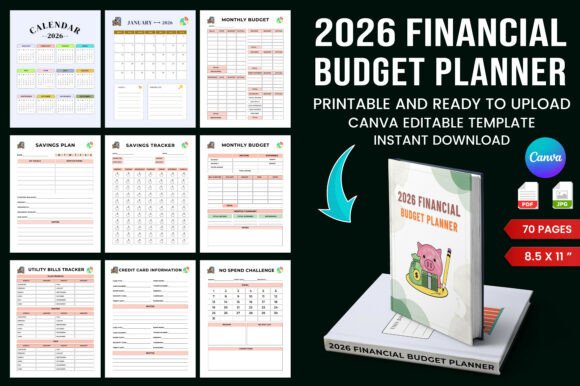
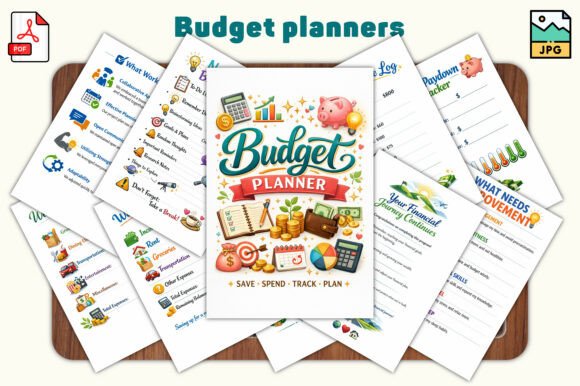
This particular planner runs 30 pages, sized at 6 by 9 inches, and comes in both JPG and PDF formats. It's built for portrait orientation, with a clean minimal style that works whether you print it out or use it digitally in apps like GoodNotes or Notability. But what matters more than the specs is how someone might actually use this thing week after week.
Where Budget Planners Fit Into Real Life
Consider a freelance graphic designer who gets paid irregularly. Some months bring three big projects, other months bring one small retainer. A traditional budgeting app that expects fixed monthly income doesn't work well here. But this planner's income and expense trackers let her log each payment as it arrives and match it against what she actually spends. She can scan the monthly budget overview to see whether this particular month is lean or flush, and adjust her spending accordingly. That's not abstract financial advice—that's Tuesday afternoon decision-making.
Or think about a young couple sharing household expenses for the first time. They each have their own spending habits, and joint money conversations can get tense. The weekly and daily spending logs give them a neutral place to track where the money goes. Instead of guessing who spent what on groceries versus takeout, they see the pattern. The bill payment and subscription trackers help catch that forgotten streaming service or gym membership nobody uses anymore. Small discoveries like that add up fast.
Savings That Actually Happen
The savings and emergency fund planners inside this system address a common pain point: wanting to save but never quite doing it. A school teacher earning a steady salary might know she should put money aside, but without a designated tracker, that intention evaporates by the time the bills hit. With the savings planner printed out and visible, she can pick a realistic amount each month and log it. The emergency fund planner works similarly, giving her a concrete number to aim for rather than a vague sense of financial security.
What makes this practical is the built-in review process. The mid-month and end-of-month budget reviews force a pause. You look at what you planned versus what actually happened. Maybe you overspent on dining out or underspent on utilities because of mild weather. These reviews don't judge you—they just show you the facts, so next month's plan can be more accurate.
Who Actually Benefits From This Type of Planner
The product description lists beginners, students, young professionals, and families. That's accurate but incomplete. Here are some less obvious users who might find this planner genuinely useful:
- Small business owners who need to separate business spending from personal spending but haven't formalized their system yet. The debt overview and debt payoff tracking pages can also help them manage business loans or credit card balances.
- Hobbyists with side income—someone who sells handmade crafts on weekends or edits videos for friends. They need to track both the income and the expenses of that side work, and the income and expense trackers handle that neatly.
- Retirees on fixed income who are adjusting from a salary to pension or savings withdrawals. The monthly budget overview helps them see if their spending aligns with their new reality.
- Creators whose income comes from multiple platforms like Patreon, YouTube ad revenue, or affiliate sales. The planner gives them one place to aggregate all those streams instead of juggling spreadsheets.
The financial goal-setting pages at the front of the planner also serve a specific need for people who have a target in mind but no framework to reach it. Maybe you want to save for a down payment on a house, pay off a car loan, or set aside money for a trip. Writing that goal down and tracking progress changes the behavior. You're not just dreaming about it—you're measuring against it.
How Different Users Approach the Same Pages
Take the debt overview and debt payoff tracking page. A freelancer with a single credit card balance might use it to plan a six-month payoff strategy. A family with student loans, a car note, and a mortgage will use the same page differently—listing multiple debts and deciding which one to attack first. The page doesn't prescribe a method. It just gives you the grid and the space to work it out yourself.
Similarly, the reflection pages and money habits check-ins at the back of the planner serve a different purpose for different people. Someone recovering from impulsive spending might use these pages weekly to trend their habits. Another person who's already disciplined might use them monthly for a quick sanity check. The flexibility comes from the structure, not from being told what to do.
What to Consider Before You Start Using This Planner
No budgeting tool works if you never open it. Before committing to this system, think about how you naturally operate with money. If you hate writing things down by hand, using this planner in a PDF editor or note-taking app makes more sense than printing it. If you prefer paper, the 6 by 9 size is compact enough to keep in a bag or on a desk without dominating your space.
Another consideration is consistency. The planner has 30 pages, which might seem overwhelming at first glance. But you don't need to use every page right away. Start with the monthly budget overview and the income and expense trackers. Add the weekly and daily spending logs when you feel ready. Introduce the mid-month and end-of-month reviews after you've built the habit of tracking. The system works best when you grow into it, not when you force yourself to fill everything out on day one.
Digital vs. Print: Not a Hard Choice
Since this planner comes in both JPG and PDF formats, you have options. Using it digitally in GoodNotes or Notability means you can duplicate pages across multiple months without buying another copy. You can also zoom in on the daily spending logs for fine-grained tracking. On the other hand, printing the pages gives you a tactile experience that some people find more grounding. A printed budget planner sitting on your desk becomes a visual reminder to stay on track. Neither option is inherently better—choose based on where you're more likely to actually use it.
For someone managing household finances for a family of four, printing multiple copies of certain pages might make sense. Each partner could have their own spending log, then you reconcile together using the monthly overview. That's a practical workflow that no app can replicate quite the same way.
Real Outcomes, Not Just Features
The value of a budget planner isn't in having 30 pages or a clean design. It's in what happens after you use it for a couple of months. You start to recognize patterns. You notice that every October your utility bill jumps, so you plan ahead. You see that buying coffee out adds up to a noticeable line item, and you decide whether that's worth keeping or cutting. The money habits check-ins help you reflect without judgment, which keeps you from abandoning the system after one overspend.
A person who uses this planner consistently over six months will likely have a clearer picture of their financial situation than someone who relies on memory or bank balance glances. That clarity leads to better decisions: less anxiety about money, fewer surprises, and more intentional spending that actually matches your priorities.
The debt payoff tracking alone can shift your mindset. When you see a number decreasing month after month, it reinforces the behavior that caused the decrease. That positive feedback loop matters more than any single feature on a page.
When You Might Outgrow This Planner
No tool is forever. If your financial life becomes significantly more complex—say you start a business with employees, manage multiple investment accounts, or deal with international income—you might eventually need software or an accountant. But for the vast majority of personal finance situations, this planner covers what matters. It handles income, expenses, savings, debt, bills, and reflection. That's the core of money management for most people, regardless of income level.
For the 20- to 50-year-old audience of creators, entrepreneurs, freelancers, and everyday earners, the question isn't whether you need to manage your money better. It's whether you'll finally sit down and do it. This planner makes that starting point as easy as printing a PDF or opening a file. The rest is just showing up and logging what happens.