Online Business Workbook Canva KDP: Organize Your Entire Venture
Running an online business often feels like juggling a dozen tasks at once. You have brand ideas bouncing around your head, content schedules to manage, product launches to plan, and finances to track. It is easy to feel scattered, especially when you are just starting out or wearing every hat in your company. The Online Business Workbook Canva KDP is a practical tool designed to gather all those moving pieces into one organized space. Instead of using random notebooks or scattered digital files, this workbook gives you a structured yet flexible system to manage your business from the ground up.
What Makes This Workbook Different
The workbook is not just another planner. It is a fully editable Canva template, which means you can open it in Canva, change the fonts, swap out colors, and rearrange the layout to match your brand identity. You are not stuck with someone else’s design choices. If your brand uses soft pastels and rounded fonts, you can make the workbook reflect that. If you prefer a clean, minimalist black-and-white look, that is equally easy. The key is that the workbook adapts to you, not the other way around.
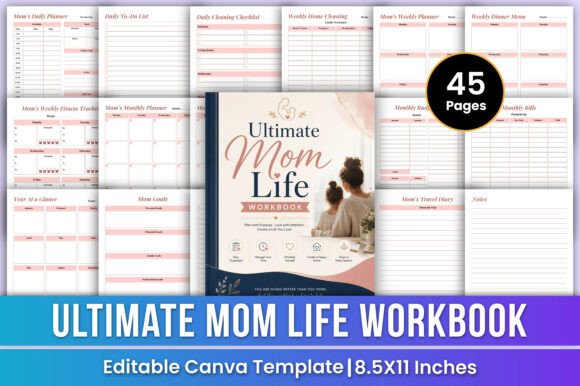
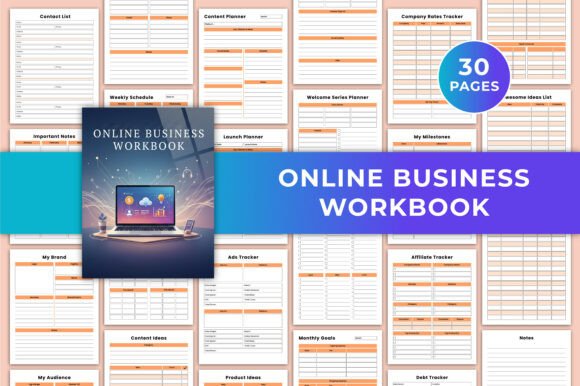
Another important detail is the format. The product includes a 31-page printable PDF, high-quality JPG and PNG files, and a layout sized at US Letter 8.5 × 11 inches with no bleed. This means you can print it at home, take it to a local print shop, or keep it entirely digital. You are not limited to one way of working.
Who Benefits from a Business Workbook
This workbook is built for a wide range of people. Freelancers who manage multiple clients can use it to track income, expenses, and project ideas. Small business owners can plan product launches, brainstorm content, and monitor their affiliate partnerships. Bloggers and content creators will appreciate the dedicated pages for content ideas, content planning, and monthly statistics. Even educators and hobbyists who sell digital products or offer services can find value in organizing their operations.
Beginners especially benefit because the workbook provides a ready-made structure. You do not need to figure out what to track or how to lay it out. The pages guide you through the essential categories: branding, audience, scheduling, finances, and planning. As you fill in the pages, you naturally build a clearer picture of your business health and direction.
Getting Started with Brand and Audience Pages
The first few pages help you lay a strong foundation. A page titled My Brand prompts you to define your brand identity, voice, and visual elements. This is useful whether you are refining an existing brand or building one from scratch. Next, My Audience asks you to think about who you serve, what they need, and how you can reach them. Understanding your audience is half the battle in online business, and having a dedicated page to revisit keeps you focused.
Practical Day-to-Day Planning
One of the workbook's strengths is how it balances big-picture thinking with daily tasks. The To-Do This Week and Weekly Schedule pages let you break down your week into manageable chunks. You can list urgent tasks, schedule content posts, or block out time for deep work. These pages are especially helpful if you work from home and struggle with maintaining a routine. Seeing your week laid out on paper or screen reduces decision fatigue and helps you stay accountable.
Tracking Monthly and Yearly Progress
Beyond weekly planning, the workbook includes Monthly Statistics and Monthly Goals pages for every month from January to December. This is where you can review your progress, note what worked, and set new targets. Over time, these pages become a valuable record of your business growth. You can look back and see how your income changed, which months were busiest, and where you need to adjust your strategy.
Content and Launch Planning Made Simple
For anyone creating content or launching products, the workbook includes dedicated pages. The Content Ideas and Content Planner pages give you space to brainstorm topics, organize them by month, and track what has been published. You can also plan email sequences with the Welcome Series Planner and Freebie Planner pages, which help you design lead magnets and automated email flows that nurture your audience.
The Launch Planner is another standout page. Whether you are launching an ebook, a course, a physical product, or a service, this page guides you through the key steps: pre-launch activities, launch day tasks, and post-launch follow-ups. It also includes an Ads Tracker so you can monitor your ad spend and performance without switching to a separate spreadsheet.
Financial Tracking Without the Headache
Financial organization is often the most intimidating part of running a business. The workbook addresses this with straightforward pages. The Income Expense Tracker allows you to log your earnings and spending in one place. The Company Rates Tracker is great for freelancers who charge different rates for different services or clients. You can also keep an eye on your debts and subscriptions with the Debt Tracker and Subscription Tracker. These pages help you see where your money goes and make informed decisions about cutting costs or raising prices.
The Bank Account Information and Credit Card Information pages are designed for quick reference. Instead of digging through emails or documents when you need a bank detail, you have everything written down in a secure, private place. Of course, it is wise to keep this workbook in a safe location since it contains sensitive information.
Creative Brainstorming and Idea Management
Great ideas often come at unexpected times. The Awesome Ideas List page gives you a dedicated spot to capture those moments of inspiration. You can write down product ideas, content angles, partnership opportunities, or anything else that sparks your interest. The Product Ideas page is more focused, helping you evaluate and develop those concepts into actual offerings. Having these pages encourages you to keep brainstorming without pressure. You can always come back later to refine or discard ideas.
Tracking Orders, Affiliates, and Milestones
If you sell physical or digital products, the Order Tracker helps you stay on top of fulfillment. You can note customer details, order dates, and delivery status. Similarly, the Affiliate Tracker is useful if you run an affiliate program or promote other people's products. You can log affiliate links, commissions earned, and payment dates. The My Top Three and My Milestones pages offer space to celebrate wins and set priorities. These small touches keep you motivated and remind you why you started your business.
Why Choose an Editable Canva Template
The Online Business Workbook Canva KDP is built on the idea that one size does not fit all. Because it is a Canva template, you can personalize every page. You can add your logo, adjust the color scheme to match your website, or change the fonts to something more legible. If you prefer to work digitally, you can type directly into the template in Canva and save it as a PDF. If you like handwriting, you can print the JPG or PDF files and use a pen. The flexibility is built into the product.
Another advantage is the No Bleed format. This means you can print at home without worrying about content being cut off. The US Letter size is standard, so finding paper or binders is easy. The high-quality JPG and PNG files also allow you to use individual pages in presentations, social media posts, or client proposals if needed.
Important Considerations Before You Start
Before diving in, there are a few things worth noting. First, you need a free or paid Canva account to edit the template. Canva is free to use, but some premium elements may require a subscription. However, the workbook itself is designed to work with standard free tools. Second, while the workbook is comprehensive, it is not a course. It will not teach you how to run a business, but it will help you organize the one you already have or are building. Think of it as a system, not a teacher.
You should also consider how you will use the workbook daily. Some people prefer to print all 31 pages and bind them into a physical book. Others might print only the pages they need each month. A third option is to keep it entirely digital and fill it out in Canva or a PDF editor. Each method works, so choose the one that fits your workflow.
Realistic Use Cases
Imagine you are a freelance graphic designer. You use the Company Rates Tracker to list your hourly rates for logo design, social media graphics, and branding packages. The Income Expense Tracker helps you log payments from clients and track software subscriptions. The Content Planner allows you to schedule portfolio posts on Instagram. The Launch Planner helps you organize a new service offering. All of this is in one workbook instead of multiple apps and notebooks.
Or consider a small business owner who sells handmade candles online. The Product Ideas page lets you brainstorm seasonal scents. The Order Tracker keeps you on top of customer orders. The Ads Tracker helps you monitor which social media ads are driving sales. The Monthly Goals pages give you a clear picture of your progress throughout the year.
For a blogger who creates content about personal finance, the Content Ideas and Content Planner pages are essential for staying consistent. The Affiliate Tracker helps you manage links and commissions from financial products you recommend. The Welcome Series Planner lets you design email sequences that turn readers into subscribers.
Final Thoughts on Staying Organized
The Online Business Workbook Canva KDP is not about rigid structures or complicated systems. It is about giving yourself a reliable place to keep your business information, ideas, and plans. Whether you are a beginner testing your first product idea or a seasoned entrepreneur managing multiple revenue streams, having a centralized workbook can reduce stress and increase clarity. The ability to customize it in Canva means you can make it truly yours, and the range of pages covers the most common needs of an online business. If you value organization and flexibility, this workbook is a practical addition to your toolkit.