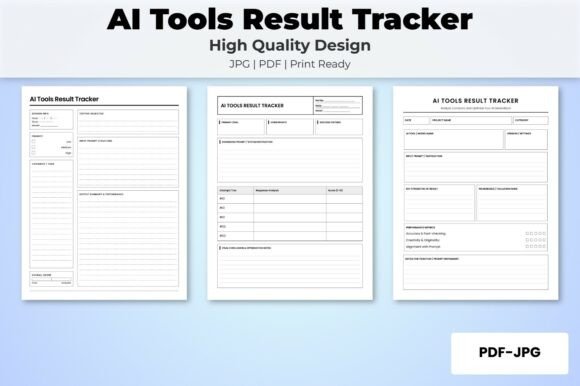
AI Tools Result Tracker KDP Interior: Your Prompt Performance Hub
If you spend any serious time with language models and AI image generators, you have likely felt the frustration of trying to remember which prompt produced that golden output last Tuesday. You tweak a phrase, get a slightly better result, then lose it in a sea of browser tabs and scattered notes. The AI Tools Result Tracker KDP Interior is designed to solve exactly this kind of chaos. It gives you a structured, printable system for logging, comparing, and refining your prompts across different AI tools, all within a clean interior layout ready for Amazon KDP publishing.
What Makes This Tracker Different from a Simple Notebook
Plenty of people scribble prompts on sticky notes or store them in messy text files. That approach works until you need to find a specific variation weeks later. The AI Tools Result Tracker KDP Interior comes with three distinct layouts, each 120 pages long, giving you flexibility in how you capture your work. You are not locked into one rigid format. Whether you prefer a minimalist grid, a detailed log with space for notes, or a structured comparison view, there is a layout that fits your workflow.
Each PDF file is delivered at 300 dpi with high resolution, so the print quality is crisp and professional. The 8.5 x 11 inch trim size with no bleed means you can upload directly to KDP without fiddling with margins or worrying about content getting trimmed off. This is a ready-to-upload interior that saves you hours of formatting work.
Three Layouts, Three Ways to Work
Having multiple layout options is not just a nice feature. It reflects the reality that no single tracking method works for every situation. When you are testing a new model, you might want a simple log that captures the prompt, the tool used, and a quick rating. When you are deep in prompt engineering for a client project, you need space for the exact parameters, the output quality, and what you changed between iterations. The AI Tools Result Tracker KDP Interior accommodates both scenarios.
The three PDF files each contain 120 pages, giving you 360 total pages of tracking capacity. You can print one layout for rapid experiments and another for detailed optimization work. If you prefer digital use, the high-resolution JPG files are included as well, giving you flexibility for tablet note-taking apps or further customization.
Practical Applications Across Different Environments
This tracker is not just for one type of user. It serves a wide range of scenarios, and the value you get depends on how you integrate it into your daily work with AI tools.
For Freelancers and Agency Professionals
If you deliver AI-generated content, images, or code to clients, consistency matters. A client may ask for a revision weeks after the initial delivery, and you need to recall exactly which prompt and settings produced that first result. With the AI Tools Result Tracker KDP Interior, you log everything at the moment of creation. You note the tool version, the temperature setting, the prompt phrasing, and the output rating. When the client comes back, you can replicate the result or show them why a different approach is better. This builds trust and saves hours of reconstruction work.
For Content Creators and Marketers
Social media posts, blog drafts, email sequences, and ad copy all benefit from prompt refinement. A marketer testing headline variations across ChatGPT, Claude, and Gemini can track which model and prompt structure yields the most engaging copy. The AI Tools Result Tracker KDP Interior lets you record the date, the campaign, the platform, and the performance rating of each output. Over time, you build a personal knowledge base of what works for your audience, reducing guesswork and improving your content velocity.
For Educators and Researchers
Teachers and academic professionals using AI for lesson planning, quiz generation, or literature review can use this tracker to document prompt effectiveness. If you are teaching prompt engineering to students, having a printed or fillable logbook helps demonstrate the iterative process. The AI Prompt Engineering Testing Logbook aspect of this interior makes it easy to show before-and-after comparisons, which is a powerful teaching tool. You can assign students a layout and have them track their own progress over a semester.
For Hobbyists and Personal Projects
Even if you use AI tools for fun, you still want to get better results. Whether you are generating digital art, writing short fiction, or experimenting with voice synthesis, logging your prompts helps you understand cause and effect. The ChatGPT Result Tracker Printable PDF function within this KDP interior gives you a dedicated space to note what worked and what did not, so you can repeat your successes and avoid repeating mistakes.
Key Strengths of This Interior Layout
The AI Tools Result Tracker KDP Interior stands out because it was designed with the end user in mind, not just as a generic grid thrown together. Here are the qualities that matter most in daily use.
Customizable to Your Workflow
Because you get three different layouts and both PDF and JPG formats, you have room to adapt the tracker to your own process. You can print one layout for your desk, load another into a tablet app, and keep the third as a backup. If you want to add your own header or branding, the high-resolution JPG files make that straightforward. The interior is suitable for Amazon KDP but also works perfectly for personal printing or digital annotation.
Clear, Uncluttered Design
Many trackers try to pack too much information onto a single page, which makes them overwhelming to use. This interior keeps the structure clean. You have enough space to write meaningful notes without feeling cramped. The 8.5 x 11 inch size is standard and comfortable for writing, whether you use a pen or a stylus. The no-bleed format means nothing gets cut off, and the 300 dpi resolution ensures that text and lines remain sharp even after multiple rounds of printing.
Designed for Long-Term Use
With 120 pages per layout, you are not flipping through a thin booklet that fills up in a week. This tracker is built for sustained use. If you run a busy freelance operation or manage multiple AI projects, you can log dozens or even hundreds of experiments before needing a new volume. The AI Model Performance Tracking Journal aspect is especially valuable for users who want to track performance trends over months, not just days.
How to Choose the Right Layout for Your Needs
With three layouts available, you might wonder which one to start with. Here is a practical breakdown based on common use cases.
- Layout one: Best for quick logging and high-volume testing. Use this when you are running many prompts in a short session and want to capture the essentials without slowing down. Ideal for rapid A/B testing of headline variations or image generation parameters.
- Layout two: Designed for detailed analysis. This layout includes more fields for parameters, model version, output quality score, and notes on what you changed. Use this for deep prompt engineering where you are systematically refining a single prompt across multiple iterations.
- Layout three: A hybrid approach with structured comparison space. This works well when you need to evaluate outputs side by side from different tools or different prompt strategies. Use this for client deliverables where you need to justify your approach or for educational settings where you are teaching prompt optimization.
You do not have to commit to one layout. Print a few pages of each and test them in your real workflow for a week. The AI Tools Result Tracker KDP Interior is customizable enough that you can eventually settle on the layout that feels most natural, or rotate between them depending on the project.
Practical Considerations Before You Buy or Upload
If you are a KDP publisher considering this interior for your own low-content or medium-content book, there are a few things to keep in mind. First, the file is ready to upload with no bleed, which simplifies the KDP upload process significantly. You do not need to adjust margins or worry about trim issues. The 8.5 x 11 inch size is one of the most popular choices for this type of journal, and it prints well on standard home printers or professional print shops.
Second, the three PDF files give you the option to create a series or bundle them into a single volume if you prefer. You could publish each layout as a separate book targeting different user needs, or combine all three into a comprehensive offering. The flexibility is built into the product.
Third, because the interior is high resolution at 300 dpi, the printed pages look clean and professional. This matters for KDP because customer reviews often comment on print quality. A crisp, readable interior leads to better feedback and fewer returns.
Who Benefits Most from This Tracker
While the tracker is useful for anyone interacting with AI tools, certain groups will see immediate value. Prompt engineers who need to document iterations for client projects or personal libraries will appreciate the structured logging. Marketers and content strategists running multi-platform AI campaigns can track which models and prompts deliver the best engagement. Educators teaching AI literacy or prompt design can use the tracker as a curriculum tool. Small business owners experimenting with AI for customer service or product descriptions can build a reference library of effective prompts.
Even if you are a casual user who just wants to improve your ChatGPT interactions, the simple act of logging prompts will make you more intentional. You start noticing patterns, like which phrasing consistently leads to better answers or which temperature setting works best for creative tasks. The AI Prompt Optimization Interior Layout supports this kind of reflective practice without adding friction to your workflow.
Realistic Recommendations for Getting Started
If you decide to use this tracker, do not try to log every single prompt from day one. That approach leads to burnout. Instead, start with one project or one AI tool. Dedicate a few pages to that specific work and see how the logging habit feels. Once you see the benefit of being able to return to a successful prompt, you will naturally expand your use.
Print a few sample pages from each layout before committing to a full run. Write on them with your preferred pen or stylus. Check that the spacing works for your handwriting size. Some people prefer more room for notes, while others want a compact format. The three layouts give you a way to test without wasting an entire notebook.
For KDP publishers, consider adding a short instruction page at the beginning of your book explaining how each layout can be used. This adds value and helps customers get immediate utility from your product. The AI Tools Result Tracker KDP Interior is already designed to be intuitive, but a brief guide can improve the user experience and reduce the learning curve.
The Bottom Line on This Tracking System
Working with AI tools is an iterative process. The difference between average results and excellent results often comes down to how well you track what you have tried. The AI Tools Result Tracker KDP Interior gives you a professional, well-structured system for doing exactly that. With three layouts, 120 pages per file, high-resolution printing, and a standard trim size that works seamlessly with KDP, it removes the friction from prompt logging and lets you focus on the creative and strategic work that matters.
Whether you are a solo creator, a team lead, an educator, or a publisher looking for a ready-to-upload interior, this tracker offers practical value that compounds over time. Every prompt you log becomes a data point in your personal optimization library. That is the kind of asset that pays dividends long after the initial experiment is over.